
WheresTheBus
WheresTheBusEducation
4.81.85K Reviews
- Version
- 5.2.1
- Installs
- 100.00K
- Age Rating
- Everyone
Screenshots
Our Review of WheresTheBus
 Analysis by Appyee
Waiting for a bus is one of those small daily problems that can make an ordinary trip feel unnecessarily difficult. I reviewed WheresTheBus as an education app from WheresTheBus, and its central idea is refreshingly practical: help riders understand where their bus is instead of leaving them to guess from a timetable or stare down the road. That focus gives the app a clear purpose, especially for students, families, and regular riders who need a little more confidence before leaving home.
The app is free and suitable for everyone, which makes it easy to consider without a financial commitment. It has built a strong audience, with an average rating of 4.8 from around 6,200 ratings and more than 100,000 installs. Those figures do not replace personal testing, but they do suggest that the basic problem it addresses is familiar to many people. In my experience, the value is not about turning public transport into a complicated planning exercise. It is about reducing uncertainty at the exact moment when uncertainty is most annoying.
Seeing the bus instead of guessing
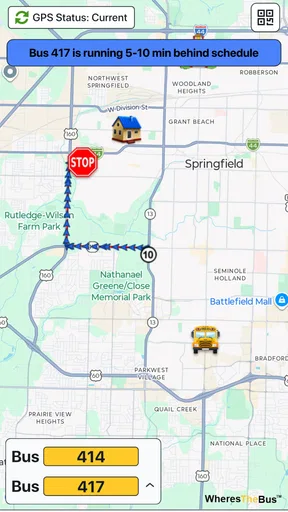
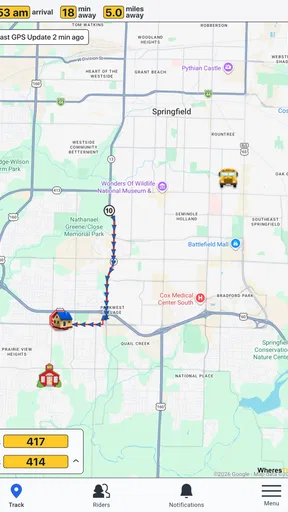
The capability that matters most here is live bus awareness. Rather than treating a printed schedule as the whole story, WheresTheBus is built around the rider’s need to know what is happening now. A schedule can tell me when a vehicle is expected, but it cannot always reflect traffic, an early departure, a delay, or the simple fact that I may have arrived at the stop too soon. A bus-tracking view is useful because it changes the question from “Should I already be seeing it?” to “Where is it in relation to my stop?”
That distinction has a real effect on everyday decisions. If I am leaving for school, work, or an appointment, I can use the app to decide whether I should walk to the stop immediately or wait a little longer. If I am already outside, the information can help me judge whether the bus is close enough that I should stay put. The benefit is modest but meaningful: I spend less time relying on instinct, especially on routes I do not use often.
I also like that the app’s purpose is easy to understand without requiring a learning period. It is not trying to be a general travel platform packed with unrelated services. The store summary calls it the WheresTheBus Rider App, and that narrow identity is reflected in the experience. The developer, WheresTheBus, has kept the concept centered on riders and their immediate transport question.
The strongest part of the app is not the map itself; it is the confidence that comes from checking before you commit to waiting. That is particularly helpful when the weather is unpleasant, when a child is waiting outside, or when missing one bus would create a long gap before the next practical option.
What using it feels like in practice
In normal use, I would open the app before walking to the stop, look for the relevant bus information, and compare its position with my planned departure. The important habit is to check at the right time. Looking once several hours earlier is not especially helpful, because bus movement changes. A quick check shortly before leaving is more useful than repeatedly refreshing throughout the day.
For a regular route, the app works best as part of a small routine. I would first confirm the route I need, then use the current bus position to decide when to leave. Once I reach the stop, I would use the same information as reassurance rather than treating it as an exact promise. Traffic and operational changes can still affect a vehicle after I check, so I would keep a sensible buffer for an appointment.
That last point is important. A tracking app should support judgment, not replace it. If the bus appears nearby, I would still walk promptly rather than assume the vehicle will remain in the same place. If it appears delayed, I would consider whether another route or a different departure makes more sense. The app is most useful when it gives me better information for a decision, not when I expect it to guarantee a perfect arrival time.
A less obvious advantage is that live information can make unfamiliar routes less stressful. On a first visit to a new school, campus, neighborhood, or appointment location, I may not know whether I am standing at the correct stop or whether the bus has already passed. A current view gives me another way to check my assumptions. It does not remove the need to read stop signs or confirm the route, but it can make the process feel less like trial and error.
Another useful habit is to check before starting the walk to the stop, not only after arriving. This matters when the stop is several minutes away. If the bus is already close, I can leave immediately. If it is farther out, I may have time to gather my things, finish a task, or get out of the rain later. That small timing adjustment is where the capability becomes genuinely practical rather than merely interesting.
A realistic morning with the app
Imagine a student preparing for class on a wet morning. The stop is not directly outside the house, and arriving too early means standing in the rain. Without live information, the student may leave according to a fixed timetable and spend several uncomfortable minutes waiting. With WheresTheBus, the student can check the bus before putting on a coat, estimate whether there is enough time to leave, and avoid turning the walk into a frantic last-minute dash.
The same pattern works for a parent coordinating a child’s school trip. The parent can use the app as a quick check before sending the child outside, then make a more informed choice about when to walk to the stop. I would still allow extra time, especially for a younger rider, but the app can reduce unnecessary waiting. That is a practical improvement over relying on a paper schedule alone.
For a worker, the value appears at the other end of the day. After a shift, I may not want to walk to the stop only to discover that the bus has just left. Checking first helps me decide whether to finish a task, buy something nearby, or head out immediately. The app does not need to manage my entire journey to be useful; knowing the bus’s current situation can be enough to improve the next ten minutes.
Occasional riders can benefit too, although they may need more time to orient themselves. A person who uses buses only for appointments or errands is less likely to remember route patterns. In that case, the live view is most valuable when combined with careful attention to the route and stop. I would not open it and blindly follow the first vehicle shown. I would confirm that it is the one serving the direction and destination I need.
Where it improves on the usual alternatives
The most obvious alternative is a static timetable. Timetables are still useful for planning the broad shape of a trip, but they are weak at answering the immediate question of whether waiting right now makes sense. WheresTheBus adds a current perspective, which is the part a printed schedule cannot provide. I would use the timetable to understand the service pattern and the app to make the final decision about when to leave.
Another alternative is a general map or travel app. Those tools can be better when I need a complete journey involving walking, transfers, trains, or several transport providers. They may offer broader route planning, but that breadth can also make a simple bus check feel less direct. WheresTheBus is more appealing when my question is narrow: where is the bus I intend to catch, and should I be heading to the stop yet?
Asking another rider or calling someone can provide reassurance, but neither option is as convenient for a quick personal check. A person may have outdated information, and a timetable displayed at a stop may not reflect the current situation. The app gives me a self-service option, although I still need to remember that live transport information is an aid rather than an absolute guarantee.
This is also why the app is not the right choice for everybody. If I need door-to-door navigation, fare comparisons, multi-city planning, or a detailed itinerary with several transfers, I would choose a broader transport tool. WheresTheBus makes more sense for someone whose main concern is the current bus rather than the entire journey.
Tradeoffs that affect everyday reliability
The greatest limitation is that the app’s usefulness depends on the quality and timeliness of the transport information available to it. If a vehicle’s position is delayed or circumstances change after the last update, I could still be surprised. That is not a reason to dismiss the app, but it is a reason to avoid cutting an appointment too close. I would treat a nearby bus as encouraging information, not as permission to leave with no margin.
There is also a human tradeoff: the more I rely on live tracking, the easier it is to become impatient when the display does not match what I see on the road. A bus may appear to be approaching while traffic slows it down, or it may move in a way that is difficult to interpret from a simple map. The best approach is to use the app for timing and confirmation while keeping basic route awareness.
New users may need a little practice identifying the correct service. This is especially true in places where several buses use nearby roads or stops. I recommend checking the route direction and stop carefully before acting on the displayed position. That extra moment prevents the most avoidable mistake: following the right-looking bus information for the wrong journey.
The app also requires a compatible device. Its minimum operating system is Android 7.0, so anyone using an older Android phone should check compatibility before planning around it. The current version is 5.2.1, which indicates that the app has continued to receive version updates over time. I would still keep the app updated when possible, because transport tools benefit from using the latest available fixes and service changes.
Because the app is free, it is easy to keep installed even if I use it only on certain days. That is helpful for occasional riders, but it also means I should not expect the same depth of planning found in paid or all-in-one travel products simply because both appear on the same phone. The advantage here is focused usefulness, not a large collection of travel features.
Small habits that make the feature more useful
My first tip is to make the check part of the departure routine rather than using it as a substitute for planning. I would look at the bus before leaving, then check again only if the wait becomes unusually long or the situation changes. This avoids wasting time refreshing while still taking advantage of current information.
My second tip is to use the app to compare choices, not just to hunt for one bus. If the bus I intended to catch is far away, I can decide whether waiting is reasonable or whether I should consider another route I already know. The app is more valuable when it supports a decision between realistic options than when it becomes a reason to stare at a moving icon.
My third tip is especially relevant for families: agree on a simple rule that the app informs timing but does not replace safe waiting behavior. A child should still remain at the correct stop and follow local safety guidance even when the bus appears close. The live view can help an adult coordinate departure, but it should not encourage anyone to rush across a road or leave a supervised location early.
For unfamiliar trips, I would take a screenshot or note the route details mentally before walking, but I would not rely solely on a remembered position. The current location can change quickly. A better workflow is to identify the stop first, confirm the bus direction, and then use the live view to time the walk. That sequence reduces confusion and makes the feature work with the rider’s surroundings rather than against them.
Who will gain the most from it
Regular bus riders are the clearest audience. If I take the same route several times a week, even a small improvement in departure timing can make the routine less tiring. Students and workers benefit because their schedules often make missed buses costly. Parents may appreciate the extra visibility when coordinating school travel, while occasional riders can use it to feel less dependent on guesswork.
The app is also a good fit for people who dislike standing outside without knowing whether the bus is close. That emotional benefit should not be underestimated. The information may not shorten every wait, but it can make the wait easier to understand. Knowing that a bus is still approaching feels different from wondering whether I missed it or stood at the wrong stop.
I would skip it as my main transport app if my trips regularly involve several kinds of transport or complicated transfers. In those situations, a broader journey planner is likely to be more efficient. I would also avoid depending on it as the only source of information for a time-critical appointment. A sensible buffer and awareness of service conditions remain necessary.
For Android users, the age requirement is Everyone, the price is free, and the minimum operating system is Android 7.0, so the entry barrier is low for many people. The app was released on Aug 1, 2016, and its current version is 5.2.1. Together with its 100K-plus installs and strong 4.8 average, that gives me the impression of a focused rider tool that has remained relevant rather than a short-lived experiment.
My final view is favorable, with one clear qualification: WheresTheBus is best when I want current bus awareness, not when I need a complete travel concierge. Its focused capability solves a real problem at the right moment. I would recommend it to a friend who regularly waits for buses, especially someone who plans departures around school, work, or family responsibilities. I would simply advise using the live position intelligently, leaving a buffer, and checking the route details before setting off. Used that way, this free education app earns its place as a practical part of a daily travel routine.
Verdict
Strengths of WheresTheBus
- Real-time bus locations help reduce uncertainty while waiting.
- Simple route tracking makes daily commutes easier to plan.
- Useful arrival estimates for multiple stops and routes.
- Supports more informed decisions when services are delayed.
- Lightweight design is convenient for quick checks on the go.
Limitations of WheresTheBus
- Coverage may be limited to supported transit agencies and regions.
- Arrival predictions can become inaccurate during traffic or outages.
- Some features may depend on a stable mobile data connection.
- The interface may feel dated compared with newer transit apps.
- Not every route or service update is always displayed immediately.
Similar Picks in This Category
View All
Duolingo: Language Lessons
Duolingo4.7

Google Classroom
Google LLC2.8

Unacademy: Learn & Crack Exams
Unacademy3.2

Bible App for Kids
Life.Church4.4

Cake - Learn English & Korean
Cake Corp.4.7

Brainly: AI Homework Helper
Brainly4.5
Frequently Asked Questions
What is WheresTheBus and what does it do?
WheresTheBus is a public transportation tracking app designed to help passengers follow buses in real time. After selecting a route, stop, or nearby service, users can view estimated arrival times and monitor vehicle locations when data is available. It is especially useful for daily commuters, students, and anyone who wants to spend less time waiting at a bus stop.
Does WheresTheBus provide accurate real-time bus locations and arrival times?
The app generally relies on information supplied by the local transit agency, so the accuracy of arrival predictions depends on the quality and frequency of that agency’s updates. In normal conditions, the estimates are helpful for planning a trip, but traffic, GPS problems, detours, breakdowns, and delayed data can affect results. Treat the displayed time as an estimate rather than a guarantee.
Can I use WheresTheBus to find routes, stops, and nearby buses?
Yes, WheresTheBus is intended to make route and stop information easier to access. Depending on the supported transit network, you can search for a route or stop, browse available services, and use your device location to identify nearby stops. Coverage and available tools may differ by city or transportation provider, so check whether your local system is supported before downloading.
Does WheresTheBus require an internet connection or access to my location?
An internet or mobile data connection is normally needed to download current schedules, vehicle positions, service alerts, and arrival predictions. Location access is optional for many features, but allowing it can make finding nearby stops faster and more convenient. If you deny location permission, you can usually search manually, although some location-based functions may be unavailable or less convenient.
Is WheresTheBus free, and are there any privacy or notification considerations?
WheresTheBus can generally be downloaded and used without an upfront charge, although availability of advertising, optional features, or region-specific limitations may vary. Before installing, review the current store listing for in-app purchase details and supported areas. Also check the requested permissions, particularly location and notifications, and enable alerts only if you want reminders about arrivals or service updates.
